 admin
adminThe Error
This was the ChatGPT Configuration error that popped up, on starting up the computer.
This is for those who have installed ChatGPT app on their desktop, and can sometimes get this error.
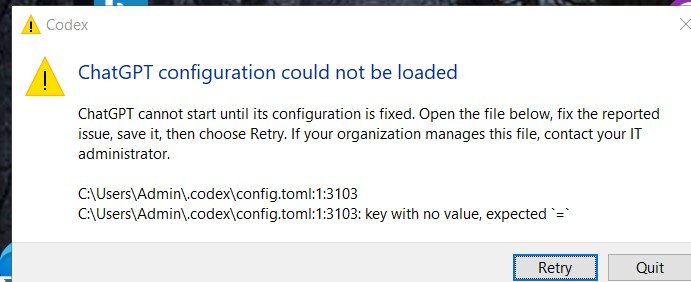
And the config.toml file turned out to be so many [NUL]s.
The Easy Fix
After trying a few edits, got to know that the easy fix was to – just delete the config.toml file, and restart and the file gets regenerated.
And Some Useful Tweaks recommended in the toml file
The new config.toml file that got regenerated after deleting the old one, looks like this:
notify = [ "C:\\Users\\Admin\\AppData\\Local\\OpenAI\\Codex\\runtimes\\cua_node\\xx-your-number-id-here-xx\\bin\\node_modules\\@oai\\sky\\bin\\windows\\codex-computer-use.exe", "turn-ended" ]
[desktop]
followUpQueueMode = "queue"

[marketplaces.openai-bundled]
source_type = "local"

source = '\\?\C:\Users\Admin\.codex\.tmp\bundled-marketplaces\openai-bundled'

[windows]
sandbox = "elevated"

[plugins."browser@openai-bundled"]
enabled = true
Had a discussion with chatgpt, and it recommended some useful tweaks that I should do.
These new settings are to be done at the top level, preferably immediately before [desktop], so they appear before any table sections.
Tweak 1:
For more involved programming, debugging or architecture work, you can specify a default reasoning effort. The supported levels depend on your selected model and client
model_reasoning_effort = "medium"
It is better to start with medium rather than forcing high reasoning on every task. You can use the model selector or other supported overrides for particularly difficult jobs
Tweak 2:
Control approval behaviour
approval_policy = "on-request"
This tells Codex when to pause for approval; it works alongside the sandbox settings rather than replacing them.
[windows]
sandbox = "elevated"
In effect, these are the changes to be added to the toml.config file, just above [Desktop]
# Personal defaults

model_reasoning_effort = "medium"

approval_policy = "on-request"











Add comment